- Product
- 1.What’s the main difference between Mavic and Phantom 4?
The Mavic is smaller, lighter, and easier to carry with you thanks to its foldable design. Its new OcuSync transmission system has a longer transmission range and 1080p resolution. Due to its larger size, the Phantom 4 has a higher maximum speed and can withstand stronger winds.
- 2.Does the folding mechanism wear out and will it need replacing?
The folding mechanism has been tested to last at least 5000 folds. It is unlikely that it will wear out during the Mavic’s lifetime.
- 3.What’s difference of camera between Mavic and Phantom 4?
The two cameras have the same features, but the Mavic’s camera has a smaller FOV, is able to focus as closely as 0.5m and can be rotated 90° for portrait shots and selfies. The Phantom 4’s larger FOV makes it better suited for landscape imaging.
- 4.Is the Mavic Pro waterproof?
No. As the Mavic chassis is low to the ground, only take off and land in suitable areas that are flat and free of puddles.
- Camera
- 1.How do you enable auto focus on the Mavic Pro camera?
Focus is essential to capturing sharp images. To enable auto focus:
1. Tap the screen in the DJI GO app camera interface.
2. Long tap the screen to enable auto focus when using ActiveTrack, TapFly and Gesture modes. (This function needs to be enabled in General Settings)
3. Focus at the center by pressing a customizable button. C1 is set by default and can be used during normal flight or while using Intelligent Flight Modes.
- 2.When shooting in manual focus mode, my shots are blurred even when moving the slider all the way to infinite focus. Why?
The focus range of the Mavic is 0.5m to infinite. Slide along the bar until you reach a focus point. Sliding straight to infinite focus does not guarantee sharp focus.
- 3.Can I zoom during shooting?
The Mavic Pro supports a 2x digital zoom, but does not support optical zoom. You can zoom in or out by draging on the screen or by pressing the customizable buttons.
- 4.How to enter Portrait mode?
Slide to the left on the screen and tap the a Portrait/Landscape icon, or by pressing customizable buttons.
- Remote Controller & WI-FI
- 1.What is the difference between using the remote controller to control the Mavic, and using your smartphone to control it via Wi-Fi?
The Mavic remote controller uses DJI’s OcuSync transmission technology, giving it an increased range of up to 4.3mi (7km) in open areas without interference, FCC compliant. When using a smartphone connected via Wi-Fi, the controllable range is 80m, and maximum altitude is 50m, making it suitable for short-range shots like selfies and for setting up ActiveTrack. You can also download photos and videos directly from the Mavic to your mobile device via Wi-Fi. By sliding the Control Mode switch on the right hand side of the aircraft, you can choose easily between Wi-FI and RC mode depending on which transmission type you need.
- 2.How do I switch between the two controller modes?
First, make sure that your aircraft is powered off.
Then, open the small cover on the right hand side of the aircraft body. Slide the switch to the left to enable Wi-Fi control, or to the right to use the remote controller.
- 3.What sizes of smartphone can fit inside the Mavic remote controller?
The Mavic remote controller can fit smartphones between 6.5-8.5mm thick and up to 160mm long, without a phone case. Phones and tablets larger than this do not fit the remote controller’s device holder.
- 4.Can I use a regular USB cable to connect my phone and remote controller?
Yes, you can. However, for the best user experience, we recommend that you use a dedicated Mavic RC (Remote Controller) Cable to connect your phone.
- 5.What Remote Controller Cables are included with the Mavic upon purchase?
Three cables are included in the box: one with Lightning connector, one with a standard Micro-USB connector and the third one is the USB Type-C connector
- 6.What is the default Wi-Fi SSID and password?
For security purposes, each Mavic has its own SSID and password that can be found on a sticker on one of the forearms of the aircraft and inside the battery compartment. For your first use, you can scan the QR code with the DJI GO app to connect to the aircraft*, or enter the password manually under your phone’s Wi-Fi settings. (*Only available for Android devices).
- 7.Can I use other QR code apps to scan the QR code and connect to the aircraft via Wi-Fi?
No. You must use the DJI GO app to connect to your aircraft.
- 8.How can I set the Wi-Fi SSID and password?
Connect to your Mavic via Wi-Fi and then enter Camera View. Now enter Wi-Fi settings to manually set the SSID and password.
- 9.How do I reset the Wi-Fi password back to default?
Turn on the Mavic in Wi-Fi mode, press the linking button and hold for 5s.
- 10.What is the benefit of dual-band Wi-Fi?
The 2.4G Wi-Fi frequency was developed a long time ago, 5G Wi-Fi is newer. As 2.4G is older, more devices use this frequency, making it more likely to suffer from interference. 5G is less prone to interference as there are less 5G devices, but not all phones support the 5G frequency. You can switch between these two frequency bands in the Wi-Fi Settings menu in the DJI GO app.
- 11.What customizable buttons does the Mavic Pro have?
C1, C2 and 5D buttons on the remote controller are customizable.
Default settings: C1: Focus at the center, C2: Play back, 5D Up: Recenter gimbal, FD Down: Tilt gimbal down, 5D Left: Zoom in, 5D Right Zoom out.
- 12.What does the Pause button on the remote controller do?
It tells the Mavic Pro to hover, pausing the flight.
- 13.What’s the difference between the Remote Controller Cable (Standard Micro USB Connector) and the Remote Controller Cable (Reverse Micro USB Connector)?
Phone with display facing up:
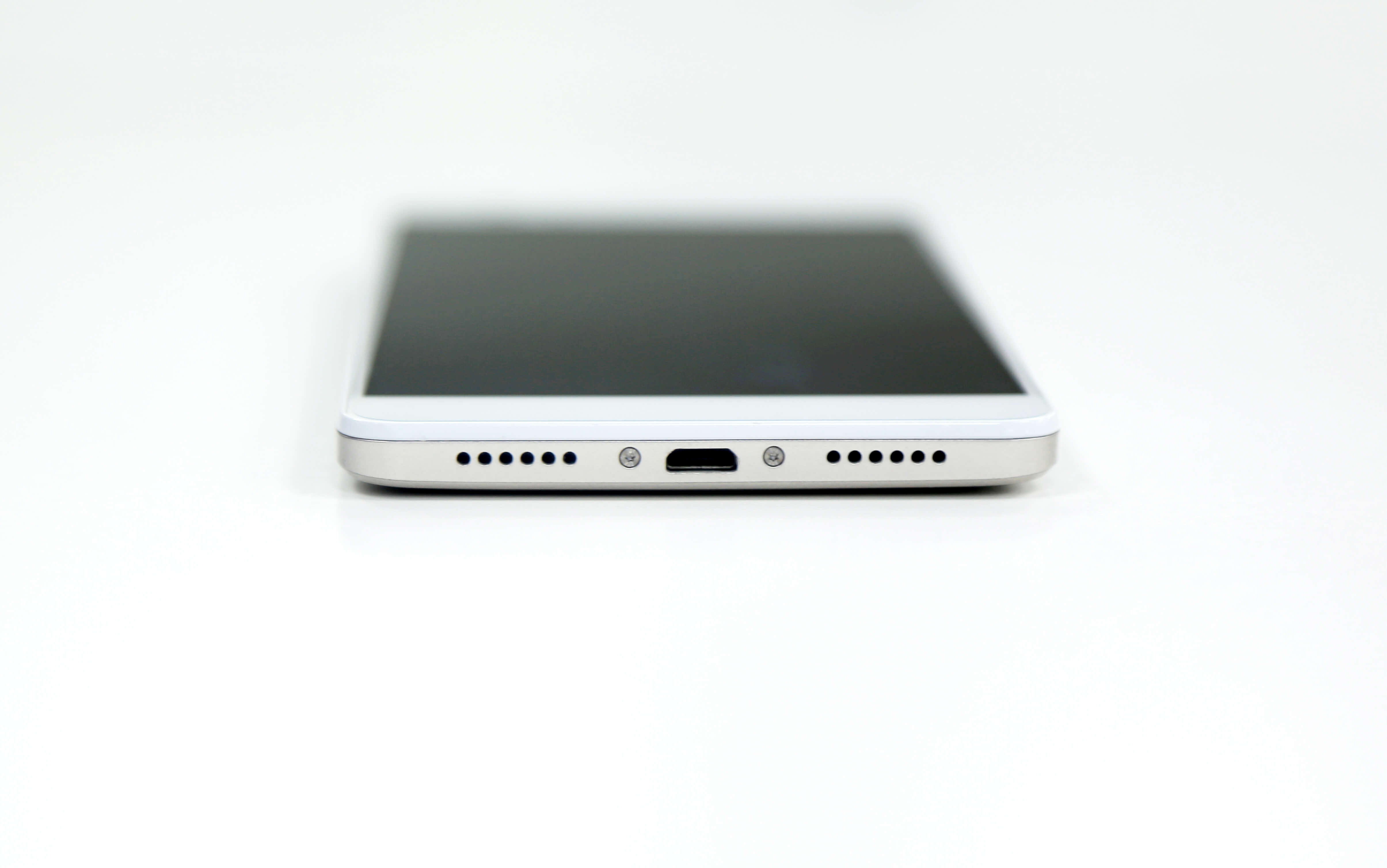
Standard Micro USB connector
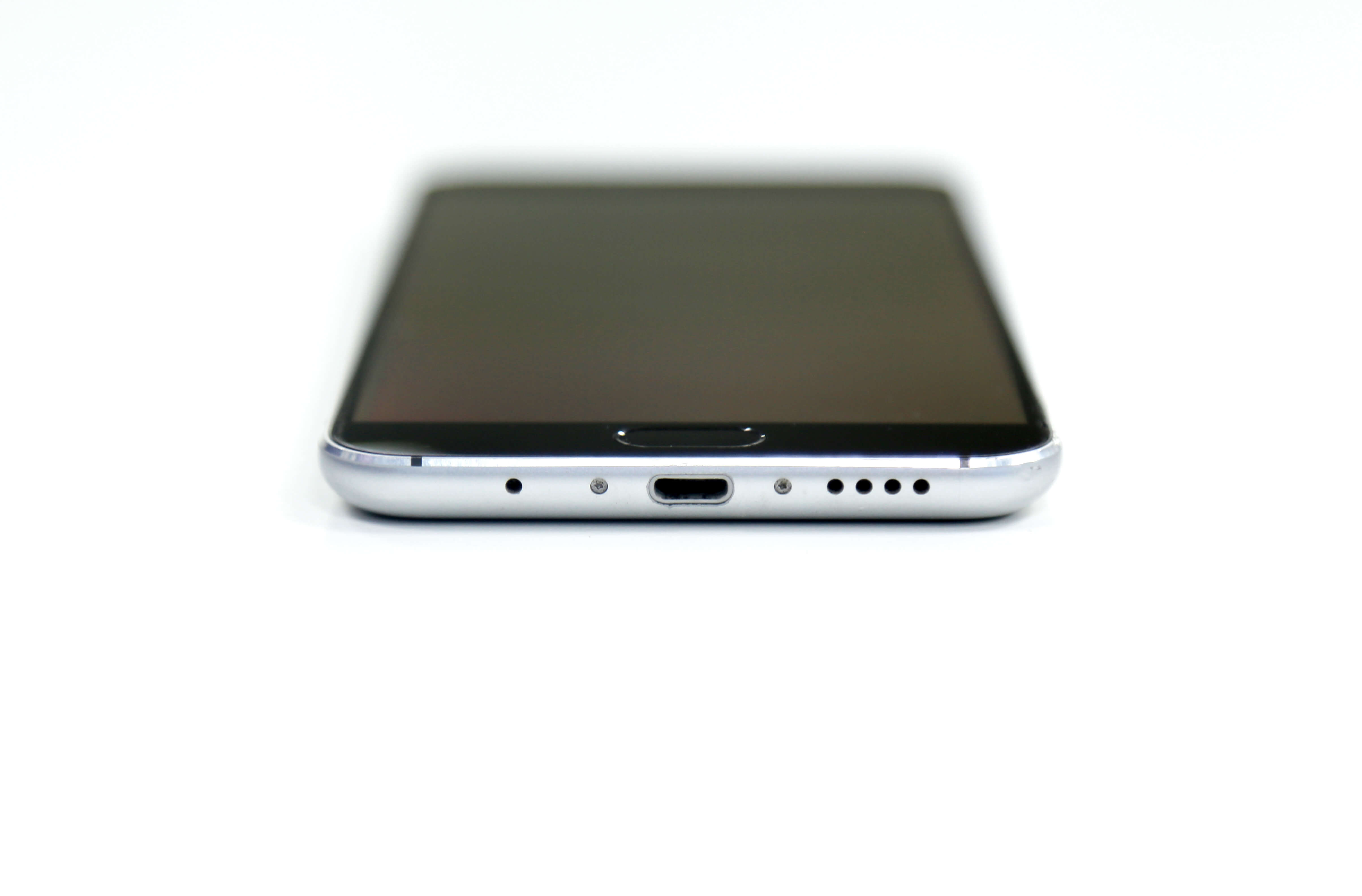
Reverse Micro USB Connector
The Remote Controller Cable (Standard Micro USB Connector) is compatible with: Samsung, Huawei, Motorola and more. The Remote Controller Cable (Reverse Micro USB Connector) is compatible with: HTC, Mi, OPPO and more. For Sony, VIVO, and other brands, phone compatibility differs by model. Please take care to choose the correct type for your phone.
- Propulsion
- 1.Do I have to take the propellers off when in transit?
No. Just fold the propellers and you are good to go.
- 2.What happens if the propellers are not fully unfolded before flight?
Once the rotors start spinning, the centrifugal force will automatically push the propellers into the correct position, so you don’t need to worry about not having unfolded them perfectly.
- 3.The Mavic’s motors are not all on the same plane. Will this affect its flight performance?
No.
- 4.What’s the highest level of wind the Mavic can resist?
The Mavic can withstand a level 5 wind, also called a fresh breeze. This is defined as wind speeds of 19–24mph (29–38kph).
- 5.How far can the Mavic fly on a single charge?
In calm weather and under ideal conditions, the Mavic can fly up to 8 miles (13km) at 31 mph (50 kph). Real-world performance will vary though, so we urge you to monitor your battery level at all times.
- 6.Why does the Mavic have a longer flight time than hover time?
Thanks to its rotor system optimized for forward flight and its aerodynamic design, when flying at the optimum speed for energy consumption, the Mavic consumes less energy then it does hovering. This is why it is able to give you a 27 minute flight time, while its hover time is 24 minutes.
- Video Transmission
- 1.What is the main benefit of the OcuSync video transmission system?
OcuSync has a range of up to 4.3 miles (7 km) with improved resistance to interference and a higher transmission throughput. At shorter ranges it can stream footage to you at 1080p resolution and also allows photo and video downloads at 40Mb/s.
- 2.What is the resolution of the live view transmitted via OcuSync?
The users can switch between 1080P and 720P manually. However we don't suggest the users use the 1080P when there is strong electromagnetic interference or for far-field transmission.
- 3.What is OcuSync’s transmission latency?
160ms-170ms from the Mavic’s camera to your device screen under ideal conditions.
- Vision
- 1.What is the difference between quick calibration and advanced calibration?
When the Vision System fails to function normally, you can do a quick calibration in the DJI GO app, or connect the aircraft to a computer to perform advanced calibration for higher precision.
- 2.What is the difference between the Mavic’s Intelligent Vision Positioning System and an Optical Flow Vision Positioning System?
The Mavic combines dual forward and downward vision sensors to realize precision hovering. Therefore, it requires no more than a patterned surface and enough available light to be able to hover stably up to 13m above the ground. Even if the Mavic is unable to identify reference points on the ground, it can still rely on its forward vision sensors to hover. In contrast, an Optical Flow system, requires information from ultrasonic sensors to supplement its view of patterned surfaces.
An example to show the difference between the two systems is when the aircraft is returning to you while you are standing on a balcony. When flying in over the balcony, drones using Optical Flow will receive data from two data sources that measure its height above the below surface differently – one being its height above the ground, and another the height above the balcony. As the data is not compatible, an Optical Flow system may become confused.
Another example is when the ground below the drone is covered by vegetation. Plants and trees do not reflect sound as well as other surfaces, causing the Optical Flow system’s ultrasonic sensors to be unable to gather altitude data.
In conclusion, the Mavic's Intelligent Vision Positioning System requires fewer inputs and is therefore more robust in its functionality.
- 3.What is the maximum distance and maximum flight speed at which the Mavic can fly while avoiding obstacles?
The Mavic will automatically avoid obstacles 50ft (15m) in front of it. The maximum speed at which the Mavic is able to avoid obstacles is 22mph (30kph).
- 4.What are the conditions required for Precision Landing?
Precision Landing is an upgraded version of GPS RTH. It needs a GPS signal strong enough to initiate Precision Landing, so that the Mavic can be navigated back to the vicinity of the take-off point.
Then, the aircraft needs to be able to visually recognize the pattern of the ground it took off from, for example cracks or other identifiable patterns. A uniform patch of sand, however, is not suitable for Precision Landing. Finally, the Mavic needs to capture footage of the ground during take-off to record its appearance. This means that you should give the Mavic sufficient time during its ascent and fly up to around 10m above your takeoff point , instead of flying away immediately after take-off.
- 5.Why can't I calibrate my Mavic's vision sensors with DJI Assistant 2 on my computer?
here are a few reasons why calibration may fail:
1. Every sensor leaves the factory with a protective cover. Check if the protective covers have been removed.
2. Check if the sensors are clean and if the preview image is clear.
3. Some computer screens may be unable to calibrate. Try using a different screen.
- Charging
- 1.Can the Mavic’s charger charge both its Intelligent Flight Battery and its remote controller?
Yes, it can charge a battery and two other devices simultaneously via USB. However, it will take longer to fully charge the devices.
- 2.Does the Mavic’s battery support quick charging?
Yes. The Mavic’s Intelligent Flight Battery supports quick charging at nearly 2C, with a maximum charging power of 100W. The rated power of Mavic Battery Charger is 50W, and the rated power of the Mavic Car Charger is 78W. When using the Mavic Advanced Charging Hub with a 100W adapter, the battery can be charged at 100W.
- 3.What is a Battery Charging Hub? What is the difference between the two versions of the Mavic’s Charging Hub?
The two Charging Hubs can both charge up to 4 batteries at one time. In order to fully charge the first battery as quickly as possible, the Intelligent Flight Batteries are charged in sequence according to their power levels, from high to low. This gives you the fastest way of getting all your batteries fully charged.
There are two main differences between the two Charging Hubs. First, the standard Charging Hub only supports the Mavic’s 50W Battery Charger and Mavic Car Charger, while the advanced version also supports the 100W Battery Charger and Car Charger from the Phantom 4. Second, the advanced version will balance the voltage of each battery cell to improve charging efficiency. When one battery’s charging enters the second-half of its charging phase, the next battery will enter the first-half of its charging phase. With 4 batteries all at 15%, the advanced charger can get 4 batteries fully charged in 140 minutes using the Phantom 4’s 100W charger, while the standard version will need 270 minutes with the Mavic’s 50W charger.
- 4.What is the Mavic’s Battery to Power Bank Adapter?
This adapter can be connected to the Mavic’s Intelligent Flight Battery, turning it into a power bank. Thanks to its high capacity, an Intelligent Flight Battery at 25% charge can fully charge the Mavic’s controller, or an iPhone 6.
- 5.What is the maximum output current for the Mavic’s Battery to Power Bank Adapter?
The adapter has two USB ports which can be used simultaneously. The output voltage is 5V, and the max current is 2A + 2A.
- Travel Notice
- 1.How many batteries can I carry in the Mavic’s Shoulder Bag?
Four. One mounted on the Mavic, one at the bottom of the bag, and one in each of the two side pockets.
- Firmware Updates
- 1.When using DJI GO 4 to update firmware, can I let the update run in the background while I use other apps?
No. DJI GO 4 will state an update error. You will have to reconnect to the internet to update again.
- 2.After downloading the firmware successfully, can I disconnect from the internet and continue updating?
Yes.
- 3.Will the update fail if the battery level of the aircraft or controller is lower than 50%?
The update will not start if the battery levels are lower than 50%. After downloading the firmware, please ensure the aircraft and controller have sufficient power to continue the update. However, the update will continue to run normally if battery levels fall below 50% during an update.
- 4.Will the remote controller be updated when upgrading the aircraft via USB?
No. In this case, only the aircraft will be updated.
Please refer to the instructions below when using DJI Assistant 2 to update.
1. To update the remote controller only: Power off the aircraft and connect the remote controller to your computer via USB.
2. To update the aircraft only: Connect the aircraft to your computer via USB.
3. To update the aircraft and remote controller together: Power on the aircraft and link it to the remote controller then connect the remote controller to the computer via USB;
Once the aircraft and remote controller are connected to your computer, DJI Assistant 2 will respond to the device that was connected first.
- 5.When the remote controller is connected via USB, my computer and DJI Assistant 2 become unresponsive. Why?
The remote controller does not support hot swapping. Please ensure that the remote controller is powered off before connecting it to the computer. Power on the remote after connecting.
- 6.What happens if the battery firmware version differs from the aircraft firmware version after the update?
DJI GO will examine version consistency for all devices. If there is a problem, follow the instructions in DJI GO for a further update.
- 7.Can I update through DJI GO 4 when using Wi-Fi to control the aircraft?
No. You cannot update the aircraft in this instance. However, you may update other components to the current aircraft firmware version.
- 8.What does it mean when the progress bar gets stuck during an update?
Both devices have different update speeds. It will take approximately five minutes for the remote controller, ten minutes for the aircraft, and 15 minutes to update both simultaneously. If the update takes longer, check your network connection and USB cable or power off, restart and try again.
- 9.What happens if the remote controller gets disconnected from the aircraft after an update?
Please refer to the instructions in the user manual and relink the remote controller and aircraft. Check the latest version numbers to make sure both have been updated properly.
- 10.If the update still fails, try the following steps:
1.Check that the battery level is at least 50% or higher before updating.
2.Check that you haven’t powered off the device during the update. If so, switch the power on again to continue.
3.Disconnecting from the internet during a firmware download will lead to update failure. However, you can disconnect the aircraft from the computer after downloading the firmware to start an update. When the update is finished, reconnect the aircraft to the computer via USB. DJI GO will show the update is 100% complete.
4.If update failure persists, or the remote controller does not link with the aircraft, there may be firmware inconsistencies between devices. In this instance, use DJI Assistant 2 on your computer to update to the latest versions separately. It is normal for the remote controller to restart a few times when updating. When linked to the aircraft, it will disconnect and relink twice.


